How do I restart SOS in a Mercedes Benz?
How do I restart SOS in a Mercedes Benz?
SOS which stands for ‘Save Our Ship’ was commonly used by the ancient sailors to address their boat which was probably in a problem or something. The same technique is used by the Mercedes Benz SOS service which comes inbuilt. The SOS service used in a Mercedes vehicle nowadays is based on the mBrace system in which ‘m’ stands for Mercedes. The system is quite efficient to reduce the time between an accident and calling emergency service caused for the casualty caused during the accident.
The SOS service connects a trained professional from the Mercedes Benz Emergency Response which is available in almost every country. Along with your query the model details of your vehicle, your precise location is also sent to that executive to help the casualty clearly and accurately.
Table of Content
- Warning from TeleAid SOS
- Choices the user has to solve the above issue?
- More about TeleAid SOS
- Is TeleAid Service still available?
- Buttons used in a Teleaid SOS
- Star Diagnostic Tool
1. Warning from TeleAid SOS
TeleAid system which was equipped in almost all Mercedes Benz vehicles assembled or manufactured before 2008, nowadays displays a message in the instrument cluster of your vehicle that “SOS TeleAID service is not Activated” or “SOS defective Please Visit Workshop”.
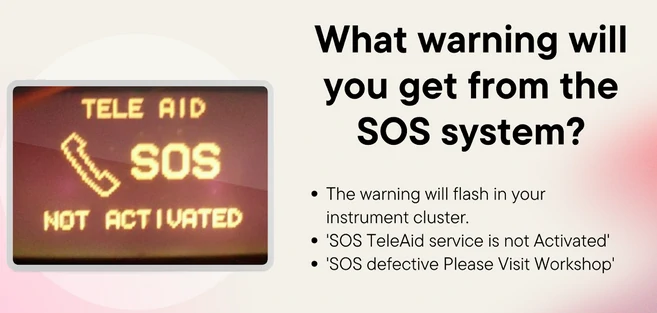
In both cases, the problem rests the same i.e. the TeleAid system is no longer supported because it uses the older analog cellular data transmission technique which vanished around February 2008. Moreover, due to this the Mercedes vehicles assembled or manufactured after 2008 were equipped with a Mercedes mBrace system which uses more latest data transmission methods.
2. Choices the user has to solve the above issue?
Well, luckily there are two options available to solve the above issue, these two are mentioned below:
Use of Star Diagnostic Tool: The first method which stands, is to disable the TeleAid system with the help of the Star Diagnostic tool which can be purchased from Amazon or any other Car workshop, but remember to purchase a genuine one! The explanation of the Star Diagnostic tool is given in Heading no. (6).
The job can also be done by installing a Mercedes Benz Star Diagnostic tool software on your computer which can be done in the following ways mentioned below. But before this, you need to ensure that there is sufficient storage space on your computer with a minimum ram of 4GB or more. Moreover, it should have a minimum of Windows 10 Professional OS (64 bit).
- The first step is to install the Xentry IOS from the internet and decompress it.
- Now run this file as Administrator and perform the following installation package as it is recommended like in any other program by choosing your suitable language.
- At last, confirm the destination folder in which you want to create the Xentry folder’s file location and let the installation begin.
- After the successful installation, click on the ‘Finish’ button and run the software after restarting your computer.
- The window opened will ask you which hardware you want to choose ‘Diagnosis VCI’ or ‘SD Connect’.
- Now continue by clicking on the Next button until you reach the ‘Star Key’ menu in which the computer will automatically choose the latest star key for you.
- Now it will ask you to choose the car brand you wish to use this Diagnostic tool for.
- And at last, it will ask you for the car model of the chosen car brand.
- Note: In between, you will also encounter the settings for the IP address in that section set connect to C4 or you can go for C6 but in this, you need a proper VCI for registering in it and also a USB or Wifi to connect it with the computer.
Moreover, since you are dealing with this on your own and not from a Mercedes dealer you need to install the Patch version of Xentry software.
All these Diagnostic tools whether the hardware or the software is accessible to several control units few of which are mentioned below:
- ECU
- Sensor Actuation
- ABS
- Air Bags
- Keyless entry
- Engine Immobilizer
- And 45+ other Control units.
To Switch to mBrace system: The second method lies is to switch your SOS system from TeleAid to mBrace which is more latest and features new technologies to ensure higher safety of the passengers. You may need to visit a Mercedes Authorized Service center to get the service carried out.

The new mBrace system also provides support in which you can actually control the components of the vehicle with your smartphone using the mBrace application which is either installed in the authorized application from Mercedes Benz or directly with their own application.
3. Is TeleAid service still available?
Well, the answer to this question is yes, that you can use the TeleAid service, but all you need is to convert the analog unit to a digital TeleAid unit to make it updated.

It goes without a say, that all these things will be done of course at your own cost but unfortunately, there are fewer chances that you’ll get a digital TeleAid unit from an authorized Mercedes Benz dealer. Because Mercedes dealers will likely change your Analog TeleAid unit to the latest mBrace SOS system. For more details, you should contact your Mercedes dealer.
4. Buttons used in a TeleAid SOS?
The buttons that are present in a Mercedes TeleAid SOS system along with their use are as under:
- Wrench Button: The wrench button is used only if the driver or the passengers need any type of Roadside assistance regarding their vehicle; it is located just below the “i” button.
- “I” Button: The main purpose for this “i” button is if the user needs any information regarding the TeleAid SOS system, he/she can press the button to get the required information. This acts as a ‘help’ button if the operator is not able to understand anything.
- SOS Button: As we all know by now that this button is used in extreme emergency conditions if the passengers or the driver needs any emergency aids.
5. Star Diagnostic Tool
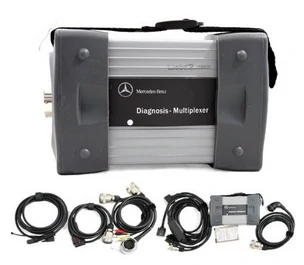
Star Diagnostic is an instrument that is used to troubleshoot any piece of program or coding embedded in a control unit in your Mercedes Benz vehicle. It also allows the operator to read or even delete a faulty program or code.
The Star Diagnostic tool can be purchased from an official or authorized Mercedes Benz dealer or from local independent workshops. Moreover, it is also available at STAR TECHinfo which happens to be an official site for the special tools, software, etc recognized by Mercedes.
6. Conclusion
Well, to summarize the whole article the SOS warning issue happens to be mainly from this TeleAid SOS system which is no longer available with that analog cellular network. And also, it is recommended that you should choose Option 2 from Subheading (2) as it will not require any hassle to configure the systems of your vehicle.
Moreover, if you are going with choice no. 1 It is again recommended that you should configure your Mercedes Benz vehicle with the Star Diagnostic tool under the guidance of a professional Mercedes executive as this instrument is very sensitive, expensive, and requires professional knowledge.